Zero-Touch VIP Onboarding: Automating the Sales Handoff with n8n & Slack
- Ivan
- Case Studies
- 17 Jan, 2026
- The Client: SaaS FinTech
- The Problem: High-value enterprise prospects were getting lost in a noisy pipeline mixed with support requests. The sales team wasted time manually setting up communication channels.
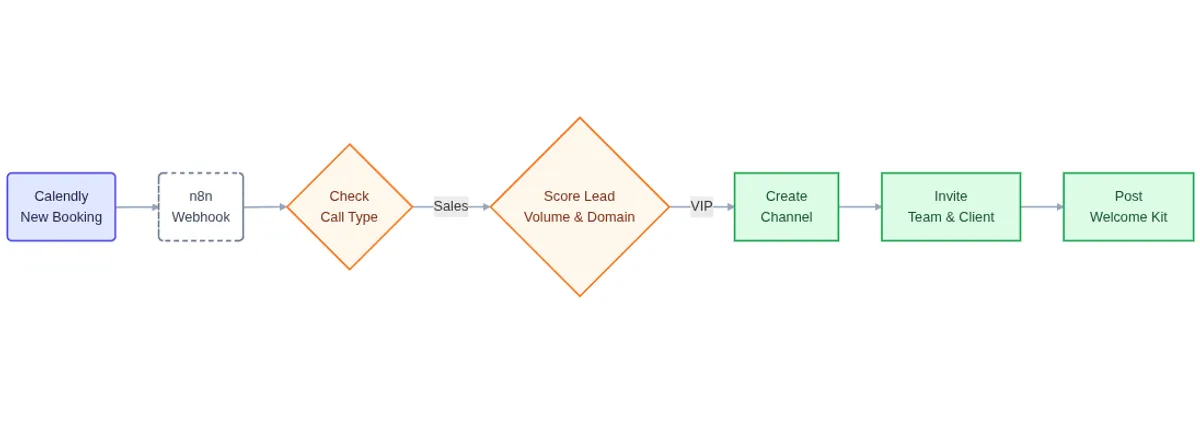
- The Stack: Calendly (Trigger) → n8n (Logic & Filtering) → Slack (Client Handoff).
- The Result: Instant “VIP” treatment for qualified leads and zero manual admin work required to launch a Slack channel.
The Challenge: The “Generic” Booking Experience
Our client is in a high-trust industry where speed establishes credibility. When a potential enterprise lead books a demo, they expect professionalism and immediate attention.
However, their booking pipeline was noisy:
-
Mixed Signals: Existing customers often used the sales demo form to ask support questions.
-
Manual Admin: Every time a real prospect booked a call, the sales team had to manually email them, create a folder, and set up a Slack channel.
-
Speed to Lead: There was a delay between the booking and the onboarding, cooling down the prospect’s interest.
We needed a way to filter out the noise and instantly roll out the red carpet for high-value prospects.
The Solution: Intelligent Filtering & Automated Handoffs
We built an n8n workflow that acts as a digital gatekeeper. It listens for every new booking, analyzes the data in real-time to determine if the lead is a “VIP,” and triggers a custom onboarding sequence.
High-Level Workflow
graph LR
    %% Style Definitions
    classDef trigger fill:#e0e7ff,stroke:#4f46e5 stroke-width:2px
    classDef action fill:#dcfce7,stroke:#16a34a stroke-width:2px
    classDef logic fill:#fff,stroke:#333,stroke-width:1px

    %% Nodes
    A(Calendly Booking):::trigger --> B(Filter & Qualify):::logic
    B --> C[Create Private Slack Channel]:::action
    C --> D[Invite Team & Client]:::action
    D --> E[Post Welcome Kit]:::action
Step 1: The Gatekeeper (Ingestion & Type Filtering)
Not all bookings are created equal. The first step was to distinguish between a new revenue opportunity and a support ticket.
The workflow intercepts the Calendly webhook and checks the Call Type.
Support Call? → Stop execution. Let the support team handle it via standard email.
Sales Call? → Proceed to qualification.
graph LR
    %% Style Definitions classDef trigger fill:#e0e7ff,stroke:#4f46e5,stroke-width:2px
    classDef stop fill:#fee2e2,stroke:#ef4444,stroke-width:2px
    classDef logic fill:#fff,stroke:#333,stroke-width:1px

    %% Nodes
    A(New Event):::trigger --> B{Check Call Type}:::logic
    B -->|Support| C[Stop Workflow]:::stop
    B -->|Sales| D(Proceed to Scoring):::logic
Step 2: The VIP Qualifier (Lead Scoring)
Once we know it’s a sales call, we need to know: Is this a high-value client?
We implemented a two-step qualification logic inside n8n:
-
Volume Check: We analyze the “Monthly Transaction Volume” field from the intake form. If the volume is below a specific threshold, they are routed to a standard email sequence. If they meet the enterprise volume, they move forward.
-
Corporate Validation: We parse the email address. Generic domains (Gmail, Hotmail, Yahoo) are flagged as lower priority. Business domains indicate a higher maturity level and trigger the VIP flow.
    graph LR
    classDef logic fill:#e0e7ff,stroke:#4f46e5,stroke-width:2px

    A(Lead Data) --> B(Check Volume):::logic
    B -->|High Volume| C(Check Email Domain):::logic
    C -->|Business Email| D[Mark as VIP]
    C -->|Gmail/Free| E[Mark as Standard]
Step 3: The “White Glove” Experience (Slack Automation)
For leads that pass the filters, the system instantly sets up a collaborative environment. This is where the magic happens. Instead of waiting for a human to see the calendar notification, n8n communicates directly with the Slack API to:
-
Create a Private Channel: Named dynamically (e.g., #client-companyname).
-
Assemble the Squad: Automatically invites the internal Account Executive and Customer Success Manager.
-
Invite the Client: Sends a Slack Connect invite to the lead’s email address.
-
The Welcome Kit: Posts a structured “Welcome” message into the channel, pinning the Google Meet link, call agenda, and relevant documentation.
    graph LR
    %% Style Definitions
    classDef action fill:#fff,stroke:#4A154B,stroke-width:2px

    %% Nodes
    A(Qualified Lead) --> B[Create Channel]:::action
    B --> C[Invite Internal
Sales Team]:::action
    C --> D[Invite Client
via Email]:::action
    D --> E[Post Meeting
Agenda]:::action
The Results
This automation transformed the first impression for prospective clients.
-
Instant Authority: Leads feel like they are dealing with a serious, tech-forward enterprise the moment they book a call.
-
15+ Minutes Saved Per Lead: No more manual channel creation, setting permissions, or copy-pasting Zoom links.
-
Contextual Clarity: The sales team enters the call with a pre-established workspace, turning a “Sales Pitch” into a “Collaborative Session.”
-
By using n8n to bridge the gap between Calendly and Slack, we turned a mundane admin task into a competitive advantage.
Need this exact workflow?
Ready to roll out the red carpet for your leads? We build custom automation workflows that save time and help you close deals faster. Let's discuss your stack.
Book a Discovery Call