Beyond the Inbox: Using n8n & AI to Automate Support Intelligence
- Ivan
- Case Studies
- 05 Dec, 2025
- The Client: High-growth D2C brand
- The Problem: Support data was a “black hole.” Management missed burning issues because they were buried in thousands of tickets.
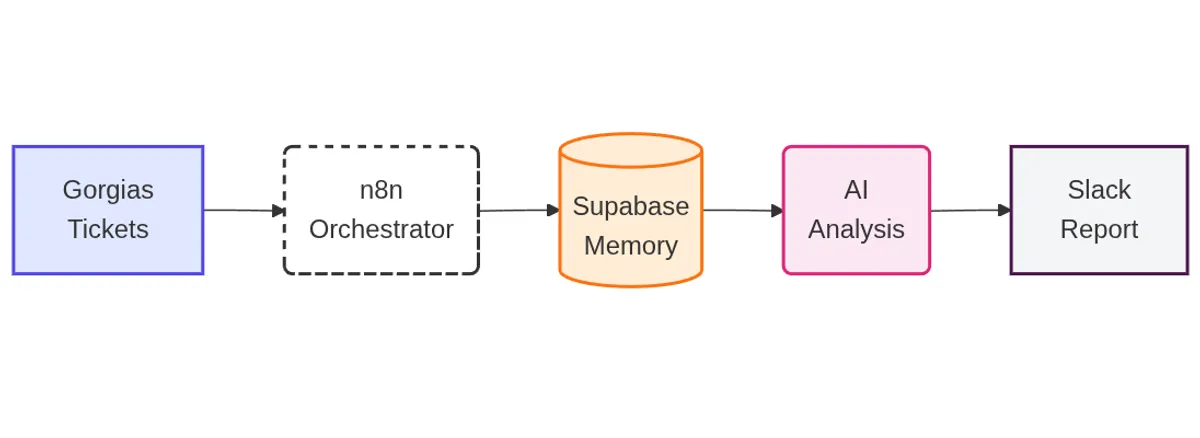
- The Stack: Gorgias (Source) → n8n (Orchestrator) → Supabase (Vector DB) → OpenAI (Analysis) → Slack (Reporting).
- The Result: 10+ hours/week saved on manual tagging and a quick turnaround on identifying product and service issues.
The Challenge: Drowning in Data
For a fast-growing D2C brand, customer support is often the first line of defense, and the first place where cracks in the operation show.
Our client was scaling, but their insights were lagging. They had thousands of tickets flowing into Gorgias every week. While their agents were great at answering tickets, they were bad at tagging them.
- The “Black Hole” Effect: Management knew there were burning issues (e.g., “Why are returns up this week?”), but they had to wait for end-of-month manual reports to find out.
- Inconsistent Data: One agent tags a refund as “Product Defect,” another tags it as “General Inquiry.” The data was useless.
They needed a way to turn support noise into strategic signals, without hiring a data analyst.
The Solution: The Support Intelligence Engine
We didn’t just write a script; we built a Support Intelligence Engine. By using n8n as the orchestrator, we created a system that “reads” every ticket, understands the context, and reports back to leadership automatically.
Here is the 3-step architecture we deployed:
Step 1: The Memory Bank (Gorgias to Supabase)
First, we had to get the data out of the silo. We built an n8n workflow to fetch tickets from Gorgias on a daily schedule.
graph LR
    %% Style Definitions
    classDef api fill:#e0e7ff,stroke:#4f46e5,stroke-width:2px
    classDef logic fill:#fff,stroke:#333,stroke-width:1px

    %% Nodes
    A(HTTP Request
Get Ticket List):::api --> B(Split into Array):::logic
    B --> C{Loop Tickets}:::logic
    C -->|Next Item| D[Filter Tags &
Clean Up]:::logic
    D -->|Valid Ticket| E(HTTP Request
Fetch Ticket Details):::api
    E --> F[(Database)]:::logic
But we didn’t just dump them into a spreadsheet.
-
Sanitization: Using n8n Guardrails node, we strip all PII (emails, phone numbers, addresses) to ensure complete data privacy.
-
Vectorization: We pass the clean ticket content through OpenAI’s embedding model.
-
Storage: The data is stored in Supabase, a powerful database that supports vector storage. This gives the AI “long-term memory,” allowing us to query semantic concepts (like “angry customers”) rather than just keywords.
Step 2: The Smart Classifier (Auto-Tagging)
Manual tagging is where data quality dies. We replaced it with AI.
graph LR
    %% Style Definitions
    classDef db fill:#fff7ed,stroke:#f97316,stroke-width:2px
    classDef ai fill:#fce7f3,stroke:#db2777,stroke-width:2px

    %% Nodes
    A[(Supabase
Untagged Tickets)]:::db --> B(Fetch Batch via n8n)
    B --> C(AI Classifier
Analyze Intent):::ai
    C --> D{Confidence High?}
    D -- Yes --> E[Update Category]
    D -- No --> F[Flag for Manual Review]
    E --> G[(Update Row)]:::db
In this workflow, n8n pulls uncategorized tickets from our Supabase store and passes them to an LLM with a strict set of definitions.
- Contextual Understanding: The AI reads the entire thread to understand intent. It knows the difference between “Where is my order?” (Shipping) and “My order arrived broken” (Defect).
- Structured Output: We force the AI to return a strict JSON format, ensuring the tags align perfectly with the client’s reporting needs.
Step 3: The Executive Brief (Slack Automation)
This is the “money shot” for the executive team.
graph LR
    %% Style Definitions
    classDef slack fill:#fff,stroke:#4A154B,stroke-width:2px
    classDef ai fill:#fce7f3,stroke:#db2777,stroke-width:2px

    %% Nodes
    A(Cron Schedule
Every Monday) --> B[(Get Last 14 Days)]
    B --> C[Aggregate &
Summarize Data]
    C --> D(AI Agent
Identify Trends):::ai
    D --> E(Format Message)
    E --> F[Post to Slack channel]:::slack
Every Monday morning, a final n8n workflow triggers. It looks at the last 14 days of data in Supabase and asks the AI to act as a Data Analyst.
- It identifies spikes in specific categories.
- It summarizes the “Voice of the Customer.”
- It formats the findings into a clean, readable message posted directly to the Slack channel.
The Results
The impact was immediate. By removing the manual labor of reporting, the Operations Director could focus on fixing the actual problems.
- Real-Time Agility: Leadership has moved from reactive to proactive. Instead of waiting weeks for a monthly report to surface “burning issues,” they now spot and fix product or service gaps in real-time. This immediate response loop has directly increased customer satisfaction and prevented negative feedback spirals.
- 100% Data Coverage: Every single ticket is now analyzed and categorized, not just the ones agents remembered to tag.
- Privacy First: All customer data is sanitized before analysis, keeping the brand compliant with data regulations.
Why This Matters for Your Brand
Most brands are sitting on a goldmine of data in their support helpdesk. If you are only using Gorgias to reply to emails, you are merely keeping the lights on. The real opportunity lies in using AI to unlock that data, transforming your support function from a cost center into a strategic engine that drives the entire business forward
Need this exact workflow?
We can deploy this Support Intelligence Engine for your brand in less than a week.
Book a Discovery Call